

 Home
Home
 About Eterspire
 News & Updates
 Screenshots
 Original Soundtrack
 Press Kit
 Developer Blog
 Update Roadmap
 Eterspire Classic
 Game Rules
 Cross-Platform Login
 Eterspire Discord Server
 Eterspire Subreddit
 Eterspire on Twitter / X
 Eterspire on Instagram
 Eterspire Wiki
 Content Creators Kit
 Content Creators Program
 Bastion Challenge
Plushie Paradise 🧸
Community Event
Until Nov 9th, 11:59 EST
More Info on Discord



About | News | Screenshots | Rules | Wiki | Press Kit | Developer Blog | Discord Server | Subreddit | Twitter | Instagram | Original Soundtrack | Content Creators Kit | Content Creators Program | Cross-Platform Login | Bastion Challenge | Roadmap
Security Improvements
As part of our ongoing efforts to improve the performance, stability, and security of Eterspire, earlier this year we introduced Eterspire Passwords 2.0, our new and improved account security system designed to better protect player accounts and prevent unauthorized access. Most newly created accounts have already been using this system for several months, and the transition has been working smoothly so far!
Today we'll begin deprecating Eterspire Passwords 1.0, our previous account management system, as part of our ongoing efforts to better protect player accounts. Very few accounts are still using Eterspire Passwords 1.0, so most players should not be affected.
If you have a very old account that still uses the previous system, or if you have created your Cross-Platform Eterspire Credentials using the previous system, you may no longer be able to log in with your old password and the game may tell you that your username or password is incorrect.
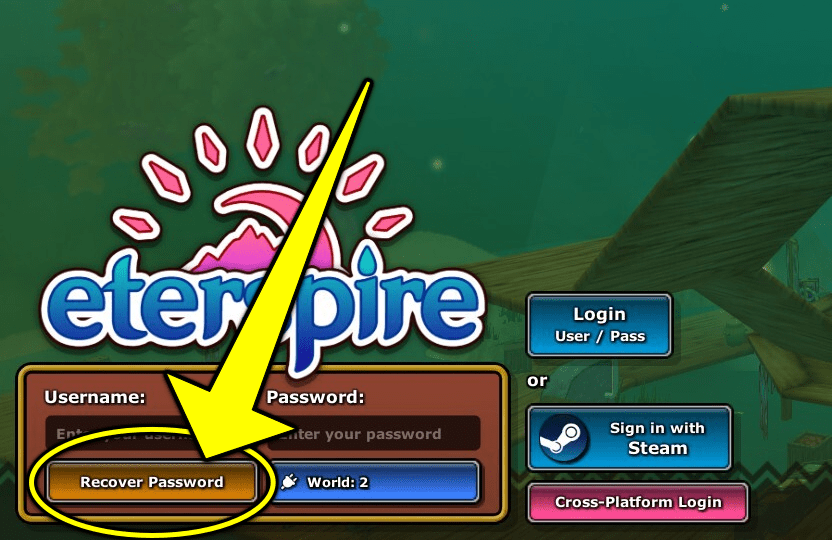
If this happens, do not worry. Your account is safe and simply needs to be updated to the new password system. To continue playing Eterspire, please create a new password by pressing the "Recover Password" button in the Login Menu:
Important!
The Password Recovery system does not allow re-using your previous password, so please make sure you choose a new password when creating it!
If you get an error message telling you that an Unexpected Error Happened, it's probably because you've re-used your old password. Try a new one!
Next Steps
As we continue migrating accounts over the next updates, some additional players may also be prompted to update their passwords as part of this transition. These updates are being made to ensure Eterspire accounts remain secure and protected moving forward.
All that said, if you experience any issues logging in or need assistance, please contact us at support@shw.ar and we will gladly help you! Thank you!